Force Enable C# Environment Scripting
WuWa Mobile Config Patcher includes support for checking, forcing, and verifying the experimental C# (C-Sharp) runtime environment for Wuthering Waves on Android.
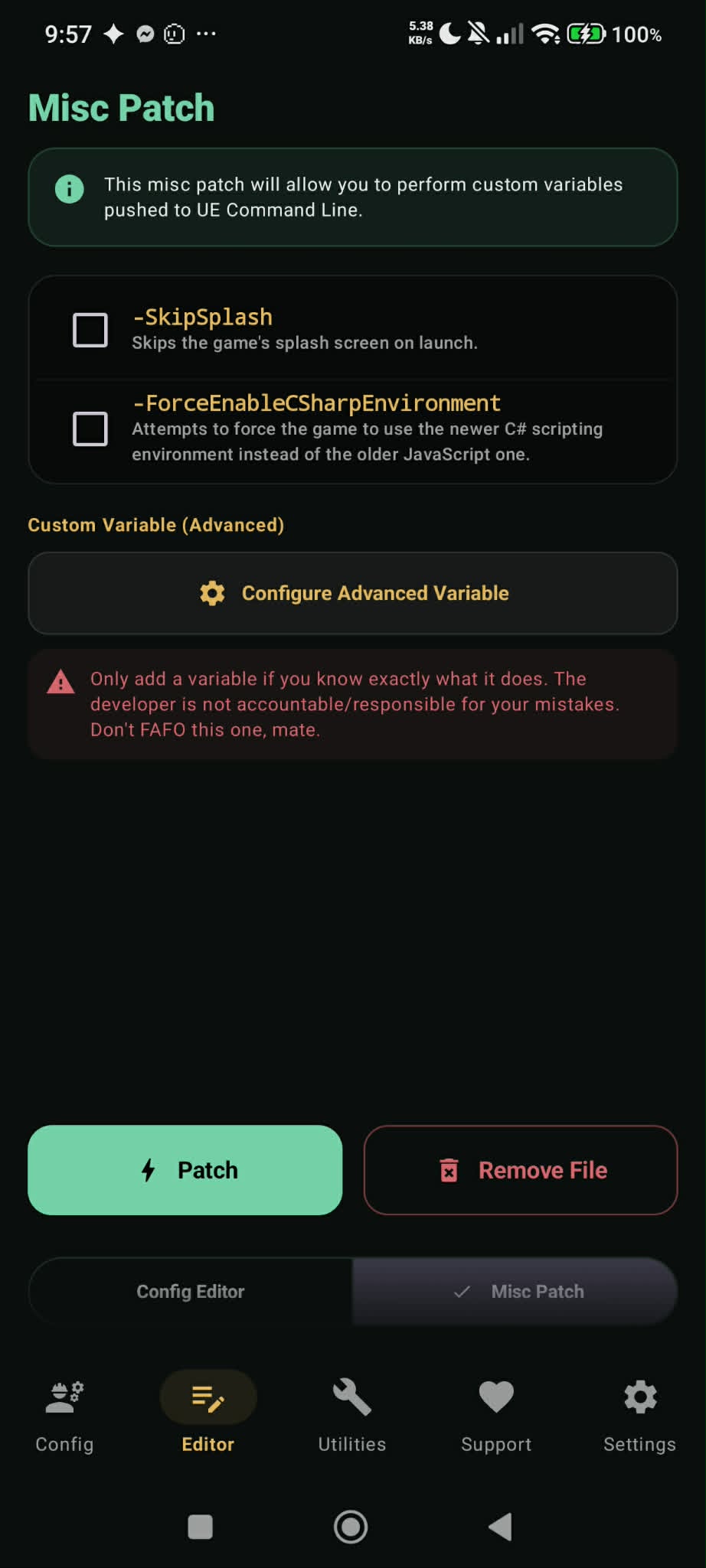
Visual Reference & Toggle UI
What is the C# Environment?
Kuro Games developed an updated C# scripting pipeline for Wuthering Waves. Pushing the engine command-line flag -ForceEnableCSharpEnvironment forces the game engine to utilize this alternate scripting pipeline. When paired with compatible Vulkan graphics drivers, it can offer substantial frame pacing improvements, reduced CPU overhead, and smoother asset streaming on supported mobile hardware.
How to Enable via Config Patcher
- Open WuWa Config Patcher.
- Navigate to Editor Tab > Misc Patch Subtab.
- Check
-ForceEnableCSharpEnvironment(and optionally-SkipSplash). - Tap Patch. This pushes the command flag directly into
.../files/UE4Game/Client/UE4CommandLine.txt.
- In-Game Client Version Asterisk (*): Launch Wuthering Waves. Inspect the version string on the top-right or bottom-left of the splash screen. An asterisk (*) at the end of the version string confirms C# is active!
- Log Verification: Go to Utilities > Decrypted Log Explorer and search for
Sharphereal. If present with initialization logs, C# is active.
Reverting or Disabling
If your device experiences instability with C# enabled, simply reopen Misc Patch and uncheck -ForceEnableCSharpEnvironment, or tap Revert to Vanilla in Utilities to restore default engine launch scripts.